
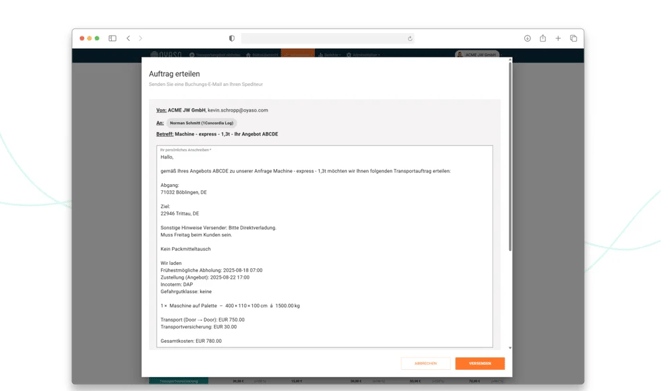
Once you have decided on a carrier's offer, the final step is the official order placement via email. Previously, OYASO opened your local email program (e.g., Outlook) by default using the so-called mailto: function.
The New Feature: You can now send the booking email directly from within OYASO! This not only saves time but also eliminates the technical limitations of the old system.
Why do we recommend sending directly via OYASO?
The old mailto: method had a strict system-imposed limit (by Windows/Browsers) of approx. 2,000 characters. For complex transports with many references and details, the text was often cut off. In addition, your local email program had to be perfectly configured. With the new direct OYASO dispatch, these problems are a thing of the past!
How the new sending process works
Don't see this feature in your account yet? By default, many existing accounts still use the old mailto: function. If you want to take advantage of direct sending, simply contact our support team briefly.
Once the new function is activated for your account, your workflow changes as follows:
-
Place Order: Click the order placement button next to the desired offer as usual.
-
The sending window opens: An external program no longer opens; instead, a new window ("Place Order - Send a booking email to your carrier") opens directly in OYASO.
-
Check & Adjust Data:
-
Sender & Recipient: The "From" (your email address) and "To" (the carrier's contact person) fields are already correctly pre-filled.
-
Cover Letter: The text field automatically contains your standard cover letter as well as all relevant transport data (Incoterms, routing, costs, etc.). Our new text editor is now available here: You can easily format critical sections in bold, italics, use text highlighting, or create structured bullet point lists to ensure the carrier never overlooks crucial information (such as customs agents or specific notification contacts).
-
Signature: Add your personal email signature in the lower field.
-
-
Add Attachments (New Feature!): You can now easily attach important documents (e.g., packing lists, customs documents, or dangerous goods declarations) directly to the email via click or drag & drop.
-
Send: A click on the orange "Send" button sends the email to your partner.
Important Note on Replies: > Although you send the email from within OYASO, your regular business email address is stored as the sender ("From"). When the carrier replies to your order placement, this reply will land normally in your personal email inbox (e.g., in Outlook) as usual.